
A Dedicated Sensor Node for Your LAN: “RoamSwitch Sensor”
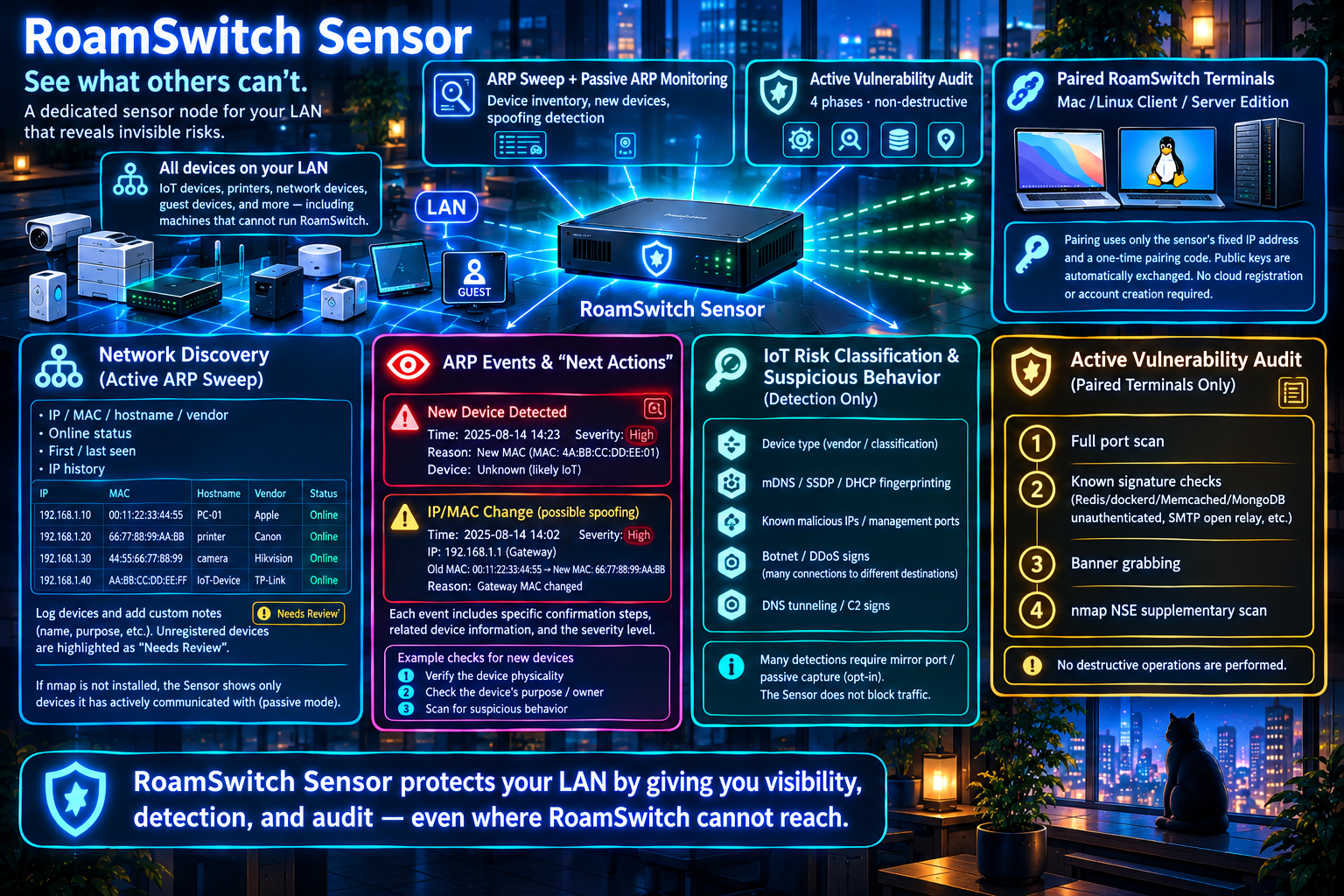
RoamSwitch Sensor is a dedicated node placed on your LAN. It audits RoamSwitch machines on the same LAN (Mac / Linux Client / Server Edition) from outside the machine. It checks what a host self-diagnosis cannot see in principle: how the machine looks from another device on the same LAN (open ports, services exposed without authentication, footholds for lateral movement). It also provides a LAN device inventory and ARP spoofing detection.
🛡️ Active Vulnerability Audit (paired endpoints only)
It audits in 4 phases: a full port scan, known-signature checks (unauthenticated exposure of Redis/dockerd/Memcached/MongoDB/Elasticsearch/CouchDB/Jenkins/VNC, SMBv1 and no signing, RDP without NLA enforced, SMTP open relay, and so on), generic banner grabbing, and supplementary checks with nmap NSE. It performs no destructive operations at all. Services running on non-standard ports (such as Redis on port 6380) are also identified from what the port sends first or how it responds, and are examined with the same read-only checks.
📋 Network Composition (Active ARP Sweep)
It finds devices on the LAN with an ARP sweep and builds an inventory of IP, MAC, host name, vendor, online status, first/last detection, and IP history. You can freely write a name, purpose, and so on for each device. Devices without notes stand out as “needs review”, so you can use this to reconcile against your device ledger. If nmap is not available, it falls back to a passive mode that shows only devices the Sensor has seen communicating.
👁️ ARP Events with “What to Do Next”
It reports the appearance of new devices and MAC changes for known IPs (a sign of ARP spoofing). Each comes with the time it occurred, severity (critical to informational), the basis for the judgment, the identity of the devices involved, and concrete steps to verify. A MAC change on the gateway IP is treated as “critical”. With opt-in passive capture enabled, it also detects ARP requests from one device to many IPs (reconnaissance inside the LAN).
🔎 Awareness of Other LAN Devices & Suspicious Behavior (Detection Only)
As reference information, it shows the MAC vendor and device class, model identification from mDNS/SSDP/DHCP/LLDP/WS-Discovery self-announcements, connections to known malicious IPs and administrative ports, signs of botnet membership or DDoS participation (connections to many destinations), and signs of DNS tunneling/C2. Most need passive capture setup such as a mirror port (opt-in). The Sensor never blocks traffic. Capture failures and dropped packets are reported through status display and notifications. It also reads VLAN-tagged frames and IPv6 traffic, and keeps the VLAN IDs it sees in the device inventory.
🔑 Pairing-Code Pairing (Ed25519, fixed IP, certificate pin)
Initially it trusts nothing. On the machine, you enter a one-time pairing code issued by the Sensor operator (valid for 10 minutes), together with the Sensor's fixed IP address and the certificate fingerprint shown on the Sensor's screen. This single step establishes mutual trust. Public keys are exchanged automatically, so you do not need to know them beforehand. No cloud registration or account creation is required.
🔐 Control-API Hardening (TLS 1.3, certificate pin, replay protection)
Control communication with the machine (TCP 50543) uses TLS 1.3 (control.tls: off / optional (default) / required). The certificate is self-signed, the fingerprint shown on screen is pinned on the machine, and it is not fetched automatically. Signatures are v2 with a timestamp and nonce, and replays are rejected. Brute force and signature failures lock out per IP.
🖥️ A 10-Language TUI That Covers Every Feature
The interactive TUI lets you operate every CLI subcommand, the daemon IPC, every setting key (settings editor, TLS status and certificate regeneration, manual pairing, notification tests), collector operations, and every event screen (including passive monitoring, IoT behavior, suspicious traffic, and vulnerability information) in 10 languages. The CLI is available in Japanese and English. Audit reports and exports are also available in 10 languages.
📅 Scheduled Audits and Change Detection (opt-in)
Audits paired devices on a schedule and shows the differences from the previous run (new findings, resolved findings, newly opened ports). Disabled by default. If all ports become invisible, the device is marked as “suspected unreachable”. The MAC address is checked before and after, and if the IP has moved to a different device, no audit is run. Devices on another subnet are audited, after confirmation, only when enabled with schedule.allow_routed_endpoints.
📣 Notifications and Audit Evidence (opt-in)
Regressions, new devices, ARP spoofing, and more can be notified to a webhook and syslog (RFC 5424). Operations are recorded in a tamper-evident log (hash chain), and results can be exported as CSV, JSON, or HTML. Notifications go only to the destinations you set, and by default nothing is sent. Data for detection is fetched daily, contains no device or audit data, and can be stopped with updates.fetch_cve_map.
🗂️ Aggregating Several Sensors (Central Collector, opt-in)
For multi-site setups, a central collector that gathers signed summaries from Sensors is included (disabled by default). It provides a per-site dashboard and CSV export, and also detects truncation or rollback of the audit log. It accepts only signed requests from registered Sensors and cannot be exposed outside the LAN without TLS.
Unmanaged devices can also be included in the summary (collector.send_unmanaged_devices; traffic content is not included). collector.send_unmanaged_audits (off by default) also collects light audit results (banners and requests are not included). The learning summary contains only counts and does not send device names.
🚨 Rogue DHCP Servers and IPv6 Routers (Detection Only)
Every hour, it sends a single DHCP (DHCPv6 for IPv6) discovery packet from a random MAC and counts every server that responds (it does not accept an IP address lease). It reports servers that appear later, servers that hand out a gateway or DNS different from the legitimate one, IPv6 router advertisements sent by anything other than the IPv4 gateway, a change of owner for an IPv6 address (NDP spoofing), and devices visible only over IPv6, not IPv4. The device inventory also supports IPv6 addresses. Sensor never blocks traffic.
🔎 Light Audit of Devices Without RoamSwitch (Opt-In, Connect Checks Only)
It examines unpaired printers, cameras, NAS devices, and the like, only within the range you allow. It only checks connectivity and reads the banners that services send on their own; it does not log in or exploit anything. It requires an approver record and a range setting, and each run is recorded in the audit log. Another opt-in (off by default) also lets you check whether a product is listed in KEV and run an unauthenticated check that sends one read request to Redis and similar services. It does not write, send passwords, or guess them.
🔒 Revocation and Lockdown When a Sensor Is Lost, Stolen or Retired
Revoke a Sensor at the collector and it stops itself on its next upload: no pairing, audits, uploads or notifications, and the stop survives a restart. You can also have it erase its keys and stored data, make it stop when it cannot reach the collector for too long, or retire it with a command. The list of endpoints that were paired with it, and how to unpair them, is shown too.
🔌 Read-Only View of the Whole LAN for Other Tools
Returns the state of the whole LAN (device count, VLANs, threat count, and so on) and a list of threats as JSON (roamswitch-sensor lan-overview --json / network-threats --json). It only reads; it does not block or change settings. It is used by the Linux MCP tools (get_lan_sensor_overview / get_lan_network_threats) and PersonalSOC. If there is a range it cannot see, it says so even when the result is 0 items.
To also guard against attacks on Sensor itself, we recommend installing the Server Edition of RoamSwitch for Linux separately on the same machine. The two can coexist as independent processes.
Audit Report Example
An example of the report written by roamswitch-sensor export all --format html (the e key in the TUI). It is a single HTML file: open it in a browser and choose “Save as PDF” to get a PDF you can hand to auditors.
RoamSwitch Sensor audit report
| Created | 2026年9月20日(日) 11:30:12 (UTC+9) |
|---|---|
| Site | HQ 3F server room |
| Sensor public key | +kbYCoN5jJSykTAr8zDv/VCs2SdBcrwYbkCrzCRgsLM= |
| Audit log | Integrity check: OK (no tampering), 18 entries, head #18 771a265c58fa2f0a8990bc6be79ff5259d96a76a0a3fea472f308df02eaa087f |
Latest audit result per device
| Device | Address | Run time | Findings | Open ports |
|---|---|---|---|---|
| web-prod-01 | 192.168.20.21 | 2026年9月20日(日) 11:00:43 (UTC+9) | 1 item | 2 |
| db-prod-01 | 192.168.20.22 | 2026年9月20日(日) 11:01:14 (UTC+9) | 2 items | 3 |
| dev-laptop-07 | 192.168.20.35 | 2026年9月20日(日) 11:02:07 (UTC+9) | No issues | 1 |
Findings
| Date/time | Device | Port | Description | Recommended action |
|---|---|---|---|---|
| 2026年9月20日(日) 11:01:14 (UTC+9) | db-prod-01 | 22 | SSH version banner exposed This SSH server exposes its version banner on connect. The banner itself is normal behavior, but it gives attackers a clue for narrowing down known vulnerabilities. | Update SSH to the latest version and minimize the banner content if needed. |
| 2026年9月20日(日) 11:01:14 (UTC+9) | db-prod-01 | 6379 | Known vulnerability: CVE-2021-32626 (Redis) NVD description (original English): Redis is an open source, in-memory database that persists on disk. In affected versions specially crafted Lua scripts executing in Redis can cause the heap-based Lua stack to be overflowed, due to incomplete checks for this condition. This can result with heap corruption and potentially remote code execution. This problem exists in all versions of Redis with Lua scripting support, starting from 2.6. The problem is fixed in versions 6.2.6, 6.0.16 and 5.0.14. | Urgently upgrade Redis to a version not affected by CVE-2021-32626, and until then restrict unauthenticated network access. |
| 2026年9月20日(日) 11:00:43 (UTC+9) | web-prod-01 | 22 | SSH version banner exposed This SSH server exposes its version banner on connect. The banner itself is normal behavior, but it gives attackers a clue for narrowing down known vulnerabilities. | Update SSH to the latest version and minimize the banner content if needed. |
| 2026年9月19日(土) 17:33:18 (UTC+9) | db-prod-01 | 22 | SSH version banner exposed This SSH server exposes its version banner on connect. The banner itself is normal behavior, but it gives attackers a clue for narrowing down known vulnerabilities. | Update SSH to the latest version and minimize the banner content if needed. |
Device ledger (all devices observed on the LAN)
| MAC | IP | Hostname | Vendor | RoamSwitch managed | Notes |
|---|---|---|---|---|---|
| 00:1b:8b:3c:9a:07 | 192.168.20.1 | _gateway | NEC Platforms | Unmanaged | HQ gateway router |
| 7c:8b:ca:61:d2:4e | 192.168.20.2 | TP-Link Technologies | Unmanaged | 3F Wi-Fi access point | |
| e4:e7:49:2b:70:c1 | 192.168.20.3 | Hewlett Packard | Unmanaged | 2F multifunction printer | |
| 90:61:ae:17:4d:e2 | 192.168.20.21 | Intel Corporate | Managed | Production web server | |
| 90:61:ae:17:4d:f9 | 192.168.20.22 | Intel Corporate | Managed | Production DB server | |
| 04:20:9a:cc:31:8f | 192.168.20.31 | sensor-hq-01 | Panasonic AVC Networks Company | Unmanaged | RoamSwitch-Sensor |
| a0:c9:a0:5e:83:2b | 192.168.20.35 | Murata Manufacturing | Managed | Development laptop | |
| 8e:0f:95:a2:64:5d | 192.168.20.44 | Unmanaged | |||
| 5e:e2:59:1d:c8:03 | 192.168.20.45 | Unmanaged | |||
| a8:3b:76:9c:20:e4 | 192.168.20.52 | Cloud Network Technology Singapore PTE. | Unmanaged |
Operations and approval log
| # | Date/time | Actor | Operation | Scope | Details |
|---|---|---|---|---|---|
| 18 | 2026年9月20日(日) 11:02:07 (UTC+9) | scheduler | audit_completed | dev-laptop-07 (Q9mW3sLp0xVc) | trigger=scheduled host=192.168.20.35 findings=0 open_ports=1 new_findings=0 resolved_findings=0 |
| 17 | 2026年9月20日(日) 11:02:05 (UTC+9) | scheduler | audit_started | dev-laptop-07 (Q9mW3sLp0xVc) | host=192.168.20.35 |
| 16 | 2026年9月20日(日) 11:01:14 (UTC+9) | scheduler | audit_completed | db-prod-01 (Zt4Kb8NwY1eR) | trigger=scheduled host=192.168.20.22 findings=2 open_ports=3 new_findings=1 resolved_findings=0 |
| 15 | 2026年9月20日(日) 11:01:12 (UTC+9) | scheduler | audit_started | db-prod-01 (Zt4Kb8NwY1eR) | host=192.168.20.22 |
| 14 | 2026年9月20日(日) 11:00:43 (UTC+9) | scheduler | audit_completed | web-prod-01 (Xk3F9aLm2QzB) | trigger=scheduled host=192.168.20.21 findings=1 open_ports=2 new_findings=1 resolved_findings=0 |
| 13 | 2026年9月20日(日) 11:00:41 (UTC+9) | scheduler | audit_started | web-prod-01 (Xk3F9aLm2QzB) | host=192.168.20.21 |
| 12 | 2026年9月19日(土) 18:11:40 (UTC+9) | cli:uid=1000 | config_changed | schedule.window_end_hour | value=5 |
| 11 | 2026年9月19日(土) 18:11:32 (UTC+9) | cli:uid=1000 | config_changed | schedule.window_start_hour | value=1 |
| 10 | 2026年9月19日(土) 18:10:02 (UTC+9) | cli:uid=1000 | config_changed | schedule.enabled | value=true |
| 9 | 2026年9月19日(土) 17:47:19 (UTC+9) | control_api: | pair | dev-laptop-07 (Q9mW3sLp0xVc) | endpoint redeemed an operator-issued pairing code and was added to the audit scope |
| 8 | 2026年9月19日(土) 17:46:52 (UTC+9) | cli:uid=1000 | pairing_code_issued | single-use, valid 10 minutes | |
| 7 | 2026年9月19日(土) 17:33:18 (UTC+9) | cli:uid=1000 | audit_completed | db-prod-01 (Zt4Kb8NwY1eR) | trigger=manual host=192.168.20.22 findings=1 open_ports=2 new_findings=1 resolved_findings=0 |
| 6 | 2026年9月19日(土) 17:33:15 (UTC+9) | cli:uid=1000 | audit_started | db-prod-01 (Zt4Kb8NwY1eR) | manual audit; host=192.168.20.22 |
| 5 | 2026年9月19日(土) 17:31:07 (UTC+9) | control_api: | pair | db-prod-01 (Zt4Kb8NwY1eR) | endpoint redeemed an operator-issued pairing code and was added to the audit scope |
| 4 | 2026年9月19日(土) 17:30:41 (UTC+9) | cli:uid=1000 | pairing_code_issued | single-use, valid 10 minutes | |
| 3 | 2026年9月19日(土) 17:12:26 (UTC+9) | control_api: | pair | web-prod-01 (Xk3F9aLm2QzB) | endpoint redeemed an operator-issued pairing code and was added to the audit scope |
| 2 | 2026年9月19日(土) 17:11:58 (UTC+9) | cli:uid=1000 | pairing_code_issued | single-use, valid 10 minutes | |
| 1 | 2026年9月19日(土) 17:00:03 (UTC+9) | daemon | daemon_started | version 0.3.4 |
RoamSwitch Sensor Audit Report
| Generated | Sun, 2026-09-20 02:30:12 (UTC) |
|---|---|
| Site | HQ – 3F server room |
| Sensor public key | +kbYCoN5jJSykTAr8zDv/VCs2SdBcrwYbkCrzCRgsLM= |
| Audit log | Integrity check: OK (no tampering detected) — 18 entries, head #18 771a265c58fa2f0a8990bc6be79ff5259d96a76a0a3fea472f308df02eaa087f |
Latest audit per endpoint
| Endpoint | Address | Timestamp | Findings | Open ports |
|---|---|---|---|---|
| web-prod-01 | 192.168.20.21 | Sun, 2026-09-20 02:00:43 (UTC) | 1 finding(s) | 2 |
| db-prod-01 | 192.168.20.22 | Sun, 2026-09-20 02:01:14 (UTC) | 2 finding(s) | 3 |
| dev-laptop-07 | 192.168.20.35 | Sun, 2026-09-20 02:02:07 (UTC) | clean | 1 |
Findings
| When | Endpoint | Port | Finding | Recommendation |
|---|---|---|---|---|
| Sun, 2026-09-20 02:01:14 (UTC) | db-prod-01 | 22 | SSH Version Banner Disclosed This SSH server discloses its version banner on connect. This is normal SSH behavior, but the banner gives an attacker a starting point to look up known vulnerabilities for that version. | Keep SSH updated to the latest version, and minimize the banner's detail if your SSH implementation allows it. |
| Sun, 2026-09-20 02:01:14 (UTC) | db-prod-01 | 6379 | Known Vulnerability: CVE-2021-32626 (Redis) Redis is an open source, in-memory database that persists on disk. In affected versions specially crafted Lua scripts executing in Redis can cause the heap-based Lua stack to be overflowed, due to incomplete checks for this condition. This can result with heap corruption and potentially remote code execution. This problem exists in all versions of Redis with Lua scripting support, starting from 2.6. The problem is fixed in versions 6.2.6, 6.0.16 and 5.0.14. | Upgrade Redis to a version not affected by CVE-2021-32626 as soon as possible, and restrict unauthenticated network access to it in the meantime. |
| Sun, 2026-09-20 02:00:43 (UTC) | web-prod-01 | 22 | SSH Version Banner Disclosed This SSH server discloses its version banner on connect. This is normal SSH behavior, but the banner gives an attacker a starting point to look up known vulnerabilities for that version. | Keep SSH updated to the latest version, and minimize the banner's detail if your SSH implementation allows it. |
| Sat, 2026-09-19 08:33:18 (UTC) | db-prod-01 | 22 | SSH Version Banner Disclosed This SSH server discloses its version banner on connect. This is normal SSH behavior, but the banner gives an attacker a starting point to look up known vulnerabilities for that version. | Keep SSH updated to the latest version, and minimize the banner's detail if your SSH implementation allows it. |
Device inventory (every device observed on the LAN)
| MAC | IP | Hostname | Vendor | Managed | Note |
|---|---|---|---|---|---|
| 00:1b:8b:3c:9a:07 | 192.168.20.1 | _gateway | NEC Platforms | no | HQ gateway router |
| 7c:8b:ca:61:d2:4e | 192.168.20.2 | TP-Link Technologies | no | 3F Wi-Fi access point | |
| e4:e7:49:2b:70:c1 | 192.168.20.3 | Hewlett Packard | no | 2F multifunction printer | |
| 90:61:ae:17:4d:e2 | 192.168.20.21 | Intel Corporate | yes | Production web server | |
| 90:61:ae:17:4d:f9 | 192.168.20.22 | Intel Corporate | yes | Production database server | |
| 04:20:9a:cc:31:8f | 192.168.20.31 | sensor-hq-01 | Panasonic AVC Networks Company | no | RoamSwitch-Sensor |
| a0:c9:a0:5e:83:2b | 192.168.20.35 | Murata Manufacturing | yes | Development laptop | |
| 8e:0f:95:a2:64:5d | 192.168.20.44 | no | |||
| 5e:e2:59:1d:c8:03 | 192.168.20.45 | no | |||
| a8:3b:76:9c:20:e4 | 192.168.20.52 | Cloud Network Technology Singapore PTE. | no |
Operation & approval log
| # | When | Actor | Action | Target | Detail |
|---|---|---|---|---|---|
| 18 | Sun, 2026-09-20 02:02:07 (UTC) | scheduler | audit_completed | dev-laptop-07 (Q9mW3sLp0xVc) | trigger=scheduled host=192.168.20.35 findings=0 open_ports=1 new_findings=0 resolved_findings=0 |
| 17 | Sun, 2026-09-20 02:02:05 (UTC) | scheduler | audit_started | dev-laptop-07 (Q9mW3sLp0xVc) | host=192.168.20.35 |
| 16 | Sun, 2026-09-20 02:01:14 (UTC) | scheduler | audit_completed | db-prod-01 (Zt4Kb8NwY1eR) | trigger=scheduled host=192.168.20.22 findings=2 open_ports=3 new_findings=1 resolved_findings=0 |
| 15 | Sun, 2026-09-20 02:01:12 (UTC) | scheduler | audit_started | db-prod-01 (Zt4Kb8NwY1eR) | host=192.168.20.22 |
| 14 | Sun, 2026-09-20 02:00:43 (UTC) | scheduler | audit_completed | web-prod-01 (Xk3F9aLm2QzB) | trigger=scheduled host=192.168.20.21 findings=1 open_ports=2 new_findings=1 resolved_findings=0 |
| 13 | Sun, 2026-09-20 02:00:41 (UTC) | scheduler | audit_started | web-prod-01 (Xk3F9aLm2QzB) | host=192.168.20.21 |
| 12 | Sat, 2026-09-19 09:11:40 (UTC) | cli:uid=1000 | config_changed | schedule.window_end_hour | value=5 |
| 11 | Sat, 2026-09-19 09:11:32 (UTC) | cli:uid=1000 | config_changed | schedule.window_start_hour | value=1 |
| 10 | Sat, 2026-09-19 09:10:02 (UTC) | cli:uid=1000 | config_changed | schedule.enabled | value=true |
| 9 | Sat, 2026-09-19 08:47:19 (UTC) | control_api: | pair | dev-laptop-07 (Q9mW3sLp0xVc) | endpoint redeemed an operator-issued pairing code and was added to the audit scope |
| 8 | Sat, 2026-09-19 08:46:52 (UTC) | cli:uid=1000 | pairing_code_issued | single-use, valid 10 minutes | |
| 7 | Sat, 2026-09-19 08:33:18 (UTC) | cli:uid=1000 | audit_completed | db-prod-01 (Zt4Kb8NwY1eR) | trigger=manual host=192.168.20.22 findings=1 open_ports=2 new_findings=1 resolved_findings=0 |
| 6 | Sat, 2026-09-19 08:33:15 (UTC) | cli:uid=1000 | audit_started | db-prod-01 (Zt4Kb8NwY1eR) | manual audit; host=192.168.20.22 |
| 5 | Sat, 2026-09-19 08:31:07 (UTC) | control_api: | pair | db-prod-01 (Zt4Kb8NwY1eR) | endpoint redeemed an operator-issued pairing code and was added to the audit scope |
| 4 | Sat, 2026-09-19 08:30:41 (UTC) | cli:uid=1000 | pairing_code_issued | single-use, valid 10 minutes | |
| 3 | Sat, 2026-09-19 08:12:26 (UTC) | control_api: | pair | web-prod-01 (Xk3F9aLm2QzB) | endpoint redeemed an operator-issued pairing code and was added to the audit scope |
| 2 | Sat, 2026-09-19 08:11:58 (UTC) | cli:uid=1000 | pairing_code_issued | single-use, valid 10 minutes | |
| 1 | Sat, 2026-09-19 08:00:03 (UTC) | daemon | daemon_started | version 0.3.4 |
All machine names, MAC addresses, IP addresses, and public keys shown are fictitious. The body of the report can be output in the display language (10 languages). Examples are shown here in Japanese and English (for display languages other than Japanese, the English version).