

PersonalSOC
Personal Security Operations Center
Collects a device's logs and defense status and turns anomalies into an evidence-backed report. It is a small security operations center (SOC) for individuals without a dedicated security person, to understand the state of their own device and decide what to do next.
Check status with one button
When you press "Check status", it reads, read-only, the device's logs (depending on the OS: SSH authentication, auditd, web, DNS, macOS unified log), the MCP and Claude Code settings, and RoamSwitch's detection history.
Dashboard
Shows the overall risk (a rough guide), counts by severity, counts by category, the trend over time, and MITRE ATT&CK techniques in charts.
Report
Compiles the sources, findings by category, and IOCs (defanged) into a Markdown report. Times are shown in the device's local time.
Autonomous investigation by an LLM (optional, off by default)
When enabled, after the check an LLM investigates on its own and writes the report. The LLM is given only permitted read-only tools, never a shell or files. IPs, domains, CVE numbers, and the like written by the LLM that are not in the collected material are flagged as possibly fabricated.
Scheduled runs (optional)
Registers with launchd on Mac and systemd on Linux, with user privileges. root is not used. It notifies only when there is a finding that was not present last time (notifications contain only counts).
10 languages
Japanese, English, German, Spanish, French, Italian, Korean, Portuguese, and Simplified and Traditional Chinese. It follows your OS language automatically.
RoamSwitch MCP integration
On a device with RoamSwitch installed, it pulls unresolved detections, failed configuration-diagnosis items, and known package vulnerabilities (CVE) from RoamSwitch's MCP server (which uses read-only tools only), and combines them with the log findings into one report. If OS package vulnerabilities could not be fully matched, the report says so.
Results from AccessScope, PathScope and Sensor
If the bundled AccessScope and PathScope are present, it runs fixed commands with fixed arguments and imports only the diagnostic summary. The arguments cannot be changed by the user, the LLM, or the screen. It also adds LAN-layer threats found by this device's RoamSwitch Sensor (rogue DHCP servers, ARP and NDP spoofing, and so on). If some range is not visible, it does not report "nothing found" even with 0 findings. Each of these can be turned off in the list of sources.
Changes since last time, and cross-checking of detections
Each time you check on screen or run on a schedule, a record is saved to the history. Compared with the previous run, it shows new findings, findings that no longer appear, findings with increased severity, guards turned off, and added MCP servers. The history is written only to PersonalSOC's own location (~/.local/state/personalsoc/history) and never includes log lines, configuration contents, or secrets. Findings from separate sources are matched by time, file path, and process name, without using an LLM or the network, and shown as markers of chains worth checking (not proof of causation).
Screenshots
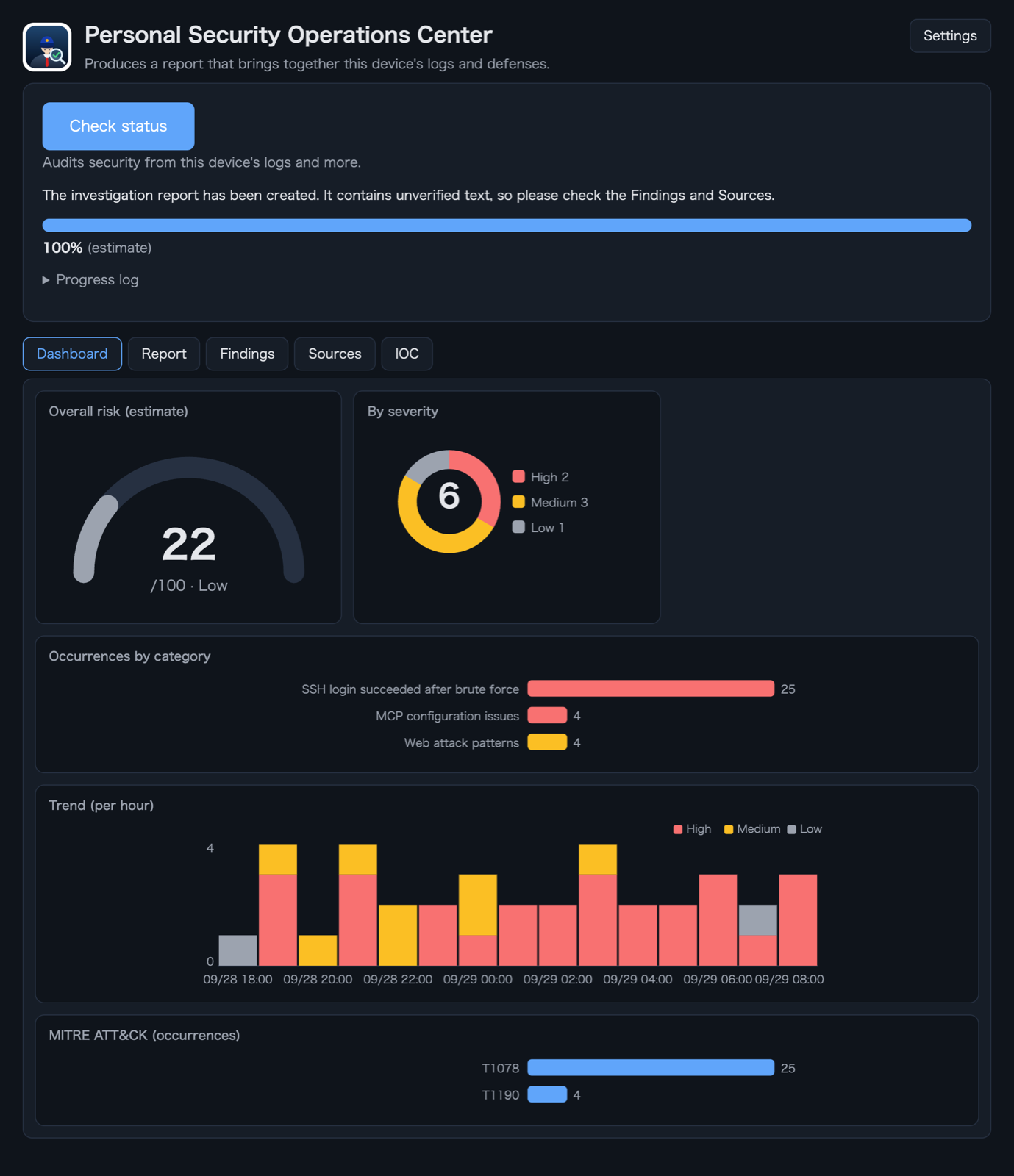
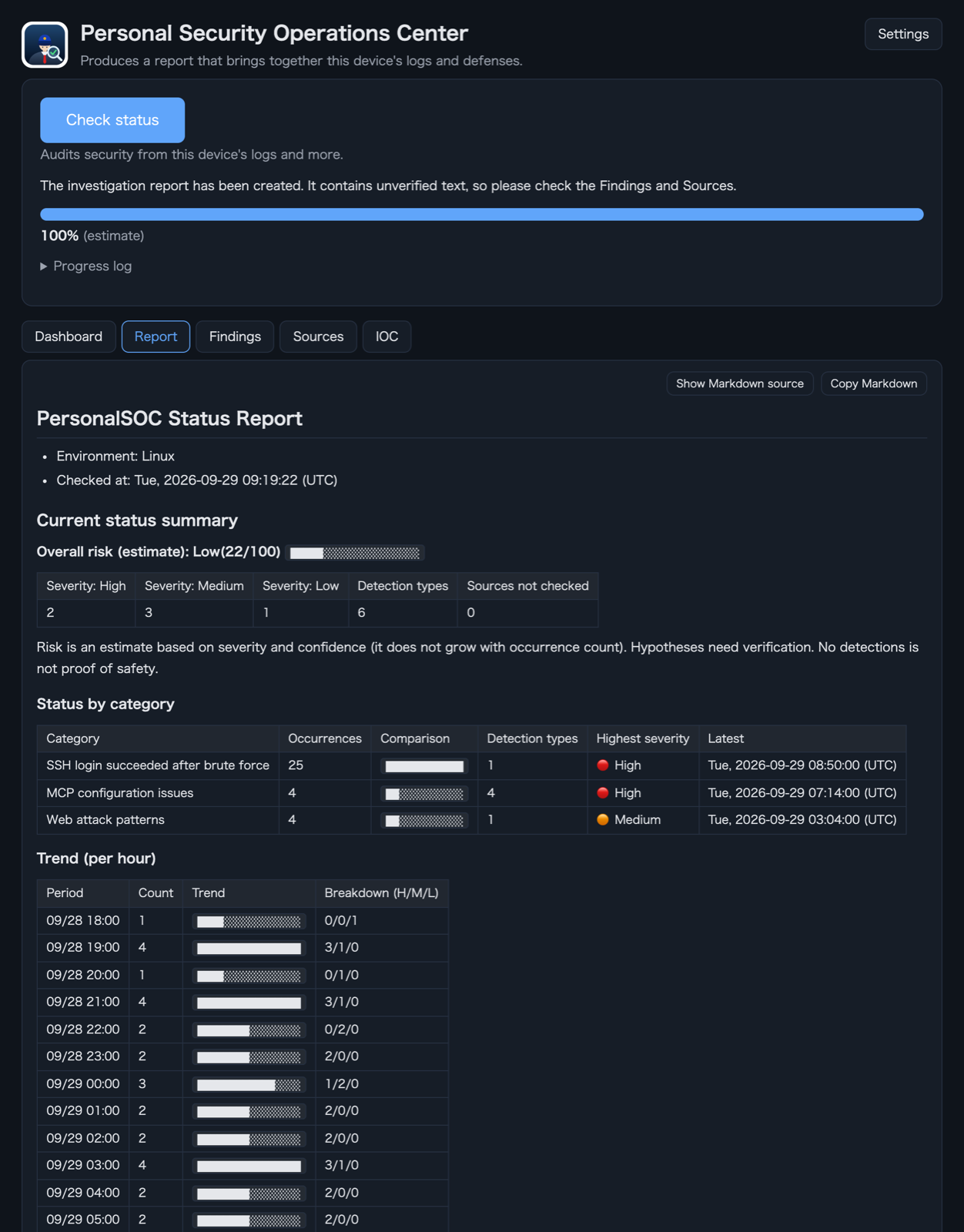
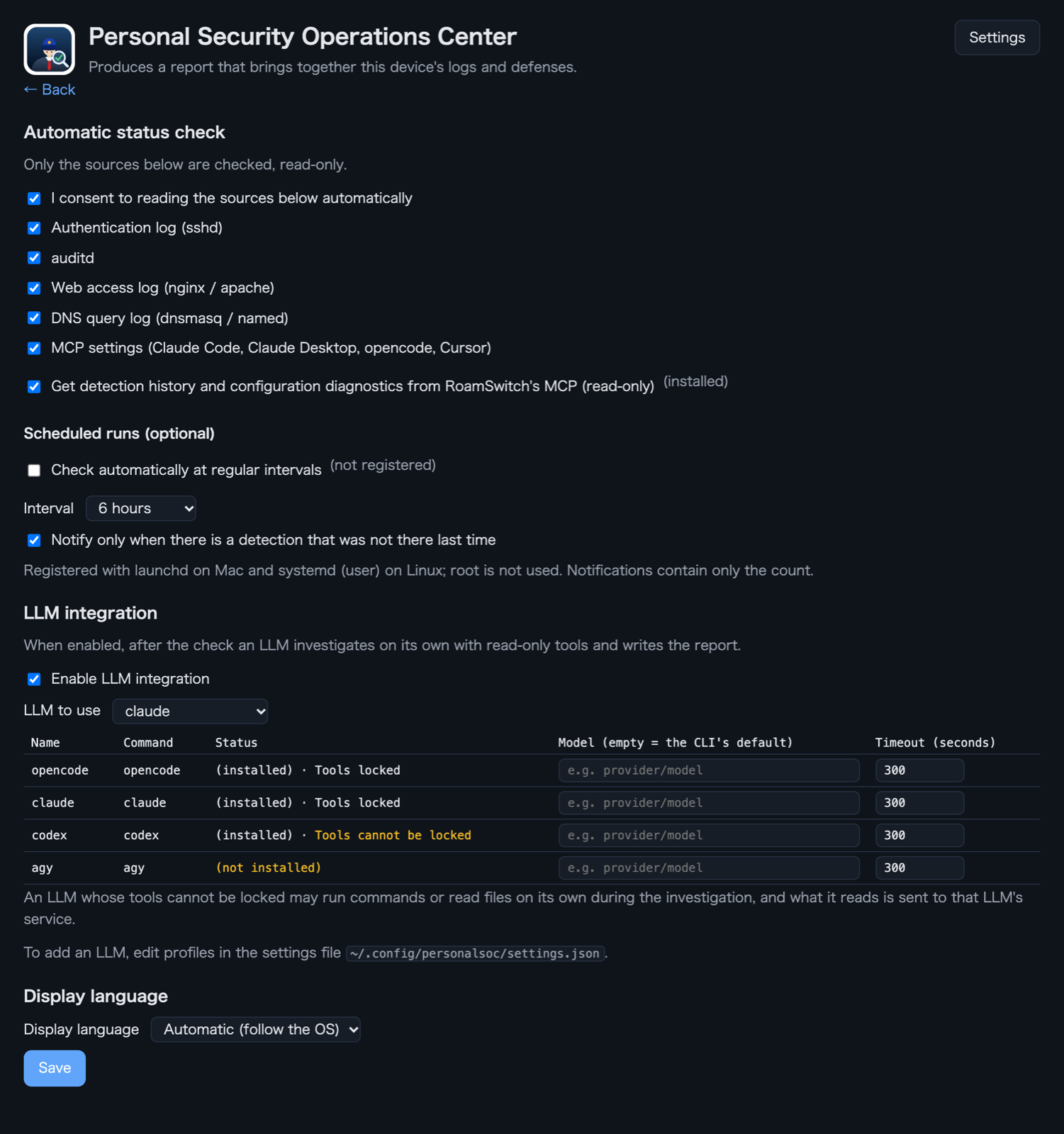
All data shown in these screens, such as IP addresses, is fictional.
Sample report
An example of a report with the LLM integration enabled. You can copy it as Markdown and share it as is.
PersonalSOC 状況報告書
- 環境: Linux
- 確認時刻: 2026年9月29日(火) 09:19:22 (UTC+9)
現在の状況サマリー
総合リスク(目安): 低(22/100) █████░░░░░░░░░░░░░░░
| 深刻度「高」 | 深刻度「中」 | 深刻度「低」 | 検知の種類 | 確認できなかった収集元 |
|---|---|---|---|---|
| 2 | 3 | 1 | 6 | 0 |
リスクは深刻度と確度による目安(発生件数では増えない)。仮説は要裏取り。検出なしは安全の証明ではない。
分類ごとの状況
| Category | 発生件数 | 件数の比較 | 検知の種類 | 最高の深刻度 | 最新 |
|---|---|---|---|---|---|
| SSH 総当たり後の認証成功 | 25 | ████████████ | 1 | 🔴 高 | 2026年9月29日(火) 08:50:00 (UTC+9) |
| MCP 設定の問題 | 4 | ██░░░░░░░░░░ | 4 | 🔴 高 | 2026年9月29日(火) 07:14:00 (UTC+9) |
| Web 攻撃パターン | 4 | ██░░░░░░░░░░ | 1 | 🟠 中 | 2026年9月29日(火) 03:04:00 (UTC+9) |
発生の推移(時間ごと)
| 時期 | 件数 | 推移 | 内訳(高/中/低) |
|---|---|---|---|
| 09/28 18:00 | 1 | ████░░░░░░░░░░░░ | 0/0/1 |
| 09/28 19:00 | 4 | ████████████████ | 3/1/0 |
| 09/28 20:00 | 1 | ████░░░░░░░░░░░░ | 0/1/0 |
| 09/28 21:00 | 4 | ████████████████ | 3/1/0 |
| 09/28 22:00 | 2 | ████████░░░░░░░░ | 0/2/0 |
| 09/28 23:00 | 2 | ████████░░░░░░░░ | 2/0/0 |
| 09/29 00:00 | 3 | ████████████░░░░ | 1/2/0 |
| 09/29 01:00 | 2 | ████████░░░░░░░░ | 2/0/0 |
| 09/29 02:00 | 2 | ████████░░░░░░░░ | 2/0/0 |
| 09/29 03:00 | 4 | ████████████████ | 3/1/0 |
| 09/29 04:00 | 2 | ████████░░░░░░░░ | 2/0/0 |
| 09/29 05:00 | 2 | ████████░░░░░░░░ | 2/0/0 |
| 09/29 06:00 | 3 | ████████████░░░░ | 3/0/0 |
| 09/29 07:00 | 2 | ████████░░░░░░░░ | 1/0/1 |
| 09/29 08:00 | 3 | ████████████░░░░ | 3/0/0 |
直近の出来事(新しい順)
| 時刻 | Category | 深刻度 | Description |
|---|---|---|---|
| 2026年9月29日(火) 08:50:00 (UTC+9) | SSH 総当たり後の認証成功 | 🔴 高 | 203.0.113.45 から失敗 24 回の後に成功が 1 回。正規利用者の入力ミスの可能性もあるため、当該アカウント… |
| 2026年9月29日(火) 07:14:00 (UTC+9) | MCP 設定の問題 | 🟡 低 | -y により初回導入の確認が省かれている。 |
| 2026年9月29日(火) 05:57:00 (UTC+9) | MCP 設定の問題 | 🔴 高 | コマンドがシェルの -c 経由。引数の組み立て次第で任意コマンドが実行される。直接実行に変えること。 |
| 2026年9月29日(火) 03:04:00 (UTC+9) | Web 攻撃パターン | 🟠 中 | 198.51.100.7 から 4 件。種別: パストラバーサル/LFI、SQLインジェクション、機密ファイル探索。成功… |
| 2026年9月29日(火) 00:11:00 (UTC+9) | MCP 設定の問題 | 🟠 中 | npx が版を固定せずに取得して実行する。上流が乗っ取られると次回起動で悪性コードが動く |
| 2026年9月28日(月) 21:18:00 (UTC+9) | MCP 設定の問題 | 🟠 中 | 環境変数 API_TOKEN に値が直接書かれている |
MITRE ATT&CK
| 技術 | 発生件数 | 件数の比較 | 検知の種類 |
|---|---|---|---|
| T1078 | 1 | ████████████ | 1 |
| T1190 | 1 | ████████████ | 1 |
監査レポート
セキュリティ監査レポート
Summary
- 侵害が確定したとは言えませんが、優先して確認すべき点が2つあります。
- SSHの総当たりの後に、同じ送信元(203.0.113.45)からログインが成功しています。 失敗が24回続いた後の成功で、パスワードが破られた可能性があります(確度: 有力)。
- Webサーバーに、パス走査とSQLインジェクションを試す要求があります。応答は404で、成功の証拠はありません(確度: 仮説)。
推奨する対応
adminアカウントのパスワードを変更し、ログイン履歴を確認する。- SSHのパスワード認証をやめ、公開鍵認証にする。
- MCPの設定にある秘密の直書きを、環境変数の参照に置き換える。
Sources
| 確認したもの | 状態 | 検出 | 備考 |
|---|---|---|---|
| 認証ログ(sshd) | 読めた | 1 | |
| auditd | 該当なし | 0 | この環境に該当するログがない |
| Web アクセスログ(nginx / apache) | 読めた | 1 | |
| DNS クエリログ(dnsmasq / named) | 該当なし | 0 | この環境に該当するログがない |
| MCP の設定(Claude Code・Claude Desktop・opencode・Cursor) | 読めた | 4 | |
| RoamSwitch(MCP、読み取り専用) | 読めた | 0 |
Findings
SSH 総当たり後の認証成功(検知 1 種類・発生 25 件)
| 深刻度 | 確度 | ATT&CK | Description | 件数 | 最新 |
|---|---|---|---|---|---|
| 🔴 高 | 有力 | T1078 | 203.0.113.45 から失敗 24 回の後に成功が 1 回。正規利用者の入力ミスの可能性もあるため、当該アカウントの直後の操作を確認すること。(根拠の行: 1, 2, 3, 4, 5, 6, 7, 8, 9, 10, 11, 12, 13, 14, 15, 16, 17, 18, 19, 20 ...) | 1 | 2026年9月29日(火) 08:50:00 (UTC+9) |
MCP 設定の問題(検知 4 種類・発生 4 件)
| 深刻度 | 確度 | ATT&CK | Description | 件数 | 最新 |
|---|---|---|---|---|---|
| 🔴 高 | 有力 | - | コマンドがシェルの -c 経由。引数の組み立て次第で任意コマンドが実行される。直接実行に変えること。 | 1 | 2026年9月29日(火) 05:57:00 (UTC+9) |
| 🟠 中 | 確定 | - | npx が版を固定せずに取得して実行する。上流が乗っ取られると次回起動で悪性コードが動く(ラグプル)。版またはハッシュを固定すること。 | 1 | 2026年9月29日(火) 00:11:00 (UTC+9) |
| 🟠 中 | 有力 | - | 環境変数 API_TOKEN に値が直接書かれている(値は表示しない)。環境変数参照かキーチェーンに移すこと。 | 1 | 2026年9月28日(月) 21:18:00 (UTC+9) |
| 🟡 低 | 確定 | - | -y により初回導入の確認が省かれている。 | 1 | 2026年9月29日(火) 07:14:00 (UTC+9) |
Web 攻撃パターン(検知 1 種類・発生 4 件)
| 深刻度 | 確度 | ATT&CK | Description | 件数 | 最新 |
|---|---|---|---|---|---|
| 🟠 中 | 有力 | T1190 | 198.51.100.7 から 4 件。種別: パストラバーサル/LFI、SQLインジェクション、機密ファイル探索。成功応答は観測されていない。(根拠の行: 1, 2, 4, 5) | 1 | 2026年9月29日(火) 03:04:00 (UTC+9) |
IOC(無害化表記)
- IP:
198[.]51[.]100[.]7 - IP:
203[.]0[.]113[.]45 - ドメイン:
malware[.]example
調査の経過
LLM が調べた理由と、PersonalSOC が実行したツール。
- 検出事項の一覧を確認する
list_findings
- SSHの成功ログインの根拠を確認する
get_evidence(1)
PersonalSOC Status Report
- Environment: Linux
- Checked at: Tue, 2026-09-29 09:19:22 (UTC)
Current status summary
Overall risk (estimate): Low(22/100) █████░░░░░░░░░░░░░░░
| Severity: High | Severity: Medium | Severity: Low | Detection types | Sources not checked |
|---|---|---|---|---|
| 2 | 3 | 1 | 6 | 0 |
Risk is an estimate based on severity and confidence (it does not grow with occurrence count). Hypotheses need verification. No detections is not proof of safety.
Status by category
| Category | Occurrences | Comparison | Detection types | Highest severity | Latest |
|---|---|---|---|---|---|
| SSH login succeeded after brute force | 25 | ████████████ | 1 | 🔴 High | Tue, 2026-09-29 08:50:00 (UTC) |
| MCP configuration issues | 4 | ██░░░░░░░░░░ | 4 | 🔴 High | Tue, 2026-09-29 07:14:00 (UTC) |
| Web attack patterns | 4 | ██░░░░░░░░░░ | 1 | 🟠 Medium | Tue, 2026-09-29 03:04:00 (UTC) |
Trend (per hour)
| Period | Count | Trend | Breakdown (H/M/L) |
|---|---|---|---|
| 09/28 18:00 | 1 | ████░░░░░░░░░░░░ | 0/0/1 |
| 09/28 19:00 | 4 | ████████████████ | 3/1/0 |
| 09/28 20:00 | 1 | ████░░░░░░░░░░░░ | 0/1/0 |
| 09/28 21:00 | 4 | ████████████████ | 3/1/0 |
| 09/28 22:00 | 2 | ████████░░░░░░░░ | 0/2/0 |
| 09/28 23:00 | 2 | ████████░░░░░░░░ | 2/0/0 |
| 09/29 00:00 | 3 | ████████████░░░░ | 1/2/0 |
| 09/29 01:00 | 2 | ████████░░░░░░░░ | 2/0/0 |
| 09/29 02:00 | 2 | ████████░░░░░░░░ | 2/0/0 |
| 09/29 03:00 | 4 | ████████████████ | 3/1/0 |
| 09/29 04:00 | 2 | ████████░░░░░░░░ | 2/0/0 |
| 09/29 05:00 | 2 | ████████░░░░░░░░ | 2/0/0 |
| 09/29 06:00 | 3 | ████████████░░░░ | 3/0/0 |
| 09/29 07:00 | 2 | ████████░░░░░░░░ | 1/0/1 |
| 09/29 08:00 | 3 | ████████████░░░░ | 3/0/0 |
Recent events (newest first)
| Time | Category | Severity | Details |
|---|---|---|---|
| Tue, 2026-09-29 08:50:00 (UTC) | SSH login succeeded after brute force | 🔴 High | 1 success |
| Tue, 2026-09-29 07:14:00 (UTC) | MCP configuration issues | 🟡 Low | -y skips the confirmation for the first installation. |
| Tue, 2026-09-29 05:57:00 (UTC) | MCP configuration issues | 🔴 High | The command runs through a shell's -c. Depending on how argu… |
| Tue, 2026-09-29 03:04:00 (UTC) | Web attack patterns | 🟠 Medium | 4 request |
| Tue, 2026-09-29 00:11:00 (UTC) | MCP configuration issues | 🟠 Medium | npx fetches and runs the package without pinning a version. … |
| Mon, 2026-09-28 21:18:00 (UTC) | MCP configuration issues | 🟠 Medium | The environment variable API_TOKEN has its value written dir… |
MITRE ATT&CK
| Technique | Occurrences | Comparison | Detection types |
|---|---|---|---|
| T1078 | 1 | ████████████ | 1 |
| T1190 | 1 | ████████████ | 1 |
Audit report
Security audit report
Summary
- A compromise is not confirmed, but two points need attention first.
- A login succeeded from the same source (203.0.113.45) right after an SSH brute-force run. Success after 24 failures suggests the password may have been guessed (confidence: likely).
- The web server received path-traversal and SQL injection attempts. All returned 404, so there is no evidence of success (confidence: hypothesis).
Recommended actions
- Change the
adminpassword and review its login history.- Turn off SSH password authentication and use public keys.
- Replace the hardcoded secret in the MCP configuration with an environment variable reference.
Sources
| Checked item | Status | Found | Note |
|---|---|---|---|
| Authentication log (sshd) | Read | 1 | |
| auditd | Not present | 0 | No matching log in this environment |
| Web access log (nginx / apache) | Read | 1 | |
| DNS query log (dnsmasq / named) | Not present | 0 | No matching log in this environment |
| MCP settings (Claude Code, Claude Desktop, opencode, Cursor) | Read | 4 | |
| RoamSwitch (MCP, read-only) | Read | 0 |
Findings
SSH login succeeded after brute force (1 type(s), 25 occurrence(s))
| Severity | Confidence | ATT&CK | Details | Count | Latest |
|---|---|---|---|---|---|
| 🔴 High | Likely | T1078 | 1 success(es) after 24 failures from 203.0.113.45. It may be a legitimate user's typo, so check what the account did right afterwards.(evidence lines: 1, 2, 3, 4, 5, 6, 7, 8, 9, 10, 11, 12, 13, 14, 15, 16, 17, 18, 19, 20 ...) | 1 | Tue, 2026-09-29 08:50:00 (UTC) |
MCP configuration issues (4 type(s), 4 occurrence(s))
| Severity | Confidence | ATT&CK | Details | Count | Latest |
|---|---|---|---|---|---|
| 🔴 High | Likely | - | The command runs through a shell's -c. Depending on how arguments are assembled, arbitrary commands can run. Change it to run the program directly. | 1 | Tue, 2026-09-29 05:57:00 (UTC) |
| 🟠 Medium | Confirmed | - | npx fetches and runs the package without pinning a version. If the upstream is hijacked, malicious code runs at the next launch (rug pull). Pin the version or a hash. | 1 | Tue, 2026-09-29 00:11:00 (UTC) |
| 🟠 Medium | Likely | - | The environment variable API_TOKEN has its value written directly (the value is not shown). Move it to an environment reference or the keychain. | 1 | Mon, 2026-09-28 21:18:00 (UTC) |
| 🟡 Low | Confirmed | - | -y skips the confirmation for the first installation. | 1 | Tue, 2026-09-29 07:14:00 (UTC) |
Web attack patterns (1 type(s), 4 occurrence(s))
| Severity | Confidence | ATT&CK | Details | Count | Latest |
|---|---|---|---|---|---|
| 🟠 Medium | Likely | T1190 | 4 request(s) from 198.51.100.7. Types: Path traversal / LFI, SQL injection, Probing for sensitive files. No successful response was observed.(evidence lines: 1, 2, 4, 5) | 1 | Tue, 2026-09-29 03:04:00 (UTC) |
IOCs (defanged)
- IP:
198[.]51[.]100[.]7 - IP:
203[.]0[.]113[.]45 - Domain:
malware[.]example
Investigation trail
The reasons the LLM gave and the tools PersonalSOC ran.
- Review the list of findings
list_findings
- Check the evidence for the successful SSH login
get_evidence(1)
The IP addresses and logs shown are all fictional. Reports come out in the display language (10 languages).
How to launch it
Mac: open PersonalSOC in the Applications folder (it has its own icon, separate from RoamSwitch).
Linux: open PersonalSOC from your application menu (it has its own icon). From a terminal, run personalsoc-app.
Command line: personalsoc scan --report (report), personalsoc scan --llm <LLM name> (the LLM investigates), personalsoc scan --format json (JSON; sarif also works), personalsoc scan --fail-on high (exit code 3 if there is any high), personalsoc scan --since-last (difference from the last run; this run is saved to the history).
Privacy and scope
PersonalSOC does all log analysis inside the device. It opens no listening ports, and its screen loads no external sites. The history of checks is kept only in PersonalSOC's own location on this device (permissions 0600) and is never sent out. The history contains only the type, title, target, severity, and count of findings, guard on/off states, MCP server names, and source status; it never contains log lines, evidence, descriptions, configuration contents, or secrets.
The LLM integration is off by default. When enabled, it passes the content of detections and the log lines that support them to the command of the LLM you chose (opencode, claude, and so on). On request, it also passes process execution records, matching lines from configuration files (up to 200 characters), and summaries from bundled tools and Sensor (PathScope up to 3 places and 80 characters, Sensor up to 200 characters). Secrets are masked and lengths are limited in all cases. It does not pass files themselves, a shell, AccessScope's evidence lines, or Sensor's detail.
Handling follows the terms of the LLM provider. With an LLM whose file reading cannot be stopped, the files it reads may also be sent, so you need to check this in the settings.
RoamSwitch's "Zero Telemetry" (communication contents and logs are not sent outside) describes RoamSwitch itself and does not cover communication when PersonalSOC's LLM integration is enabled. With the LLM integration off, PersonalSOC never sends log contents outside the device.
License
PersonalSOC is licensed under the Apache License 2.0 and is not covered by the RoamSwitch license agreement (EULA). The license text, NOTICE and the list of bundled third-party software are inside the app on Mac (PersonalSOC.app/Contents/Resources) and in /usr/share/licenses/personalsoc/ on Linux.
Requirements and updates
macOS 12 or later. Linux requires WebKitGTK 4.1 (libwebkit2gtk-4.1), which deb / rpm installs automatically. On Arch, install webkit2gtk-4.1 as an optional dependency. On Mac, you can update from within the app via Settings "Update". It communicates only when you press the button, and installs a downloaded file only after verifying its signature. On Linux, updates are included in RoamSwitch package updates.