 RoamSwitch
by Lafine Systems Design
- Products ▾
- Docs ▾
- Manuals ▾
- Legal & Policies ▾
- Support ▾
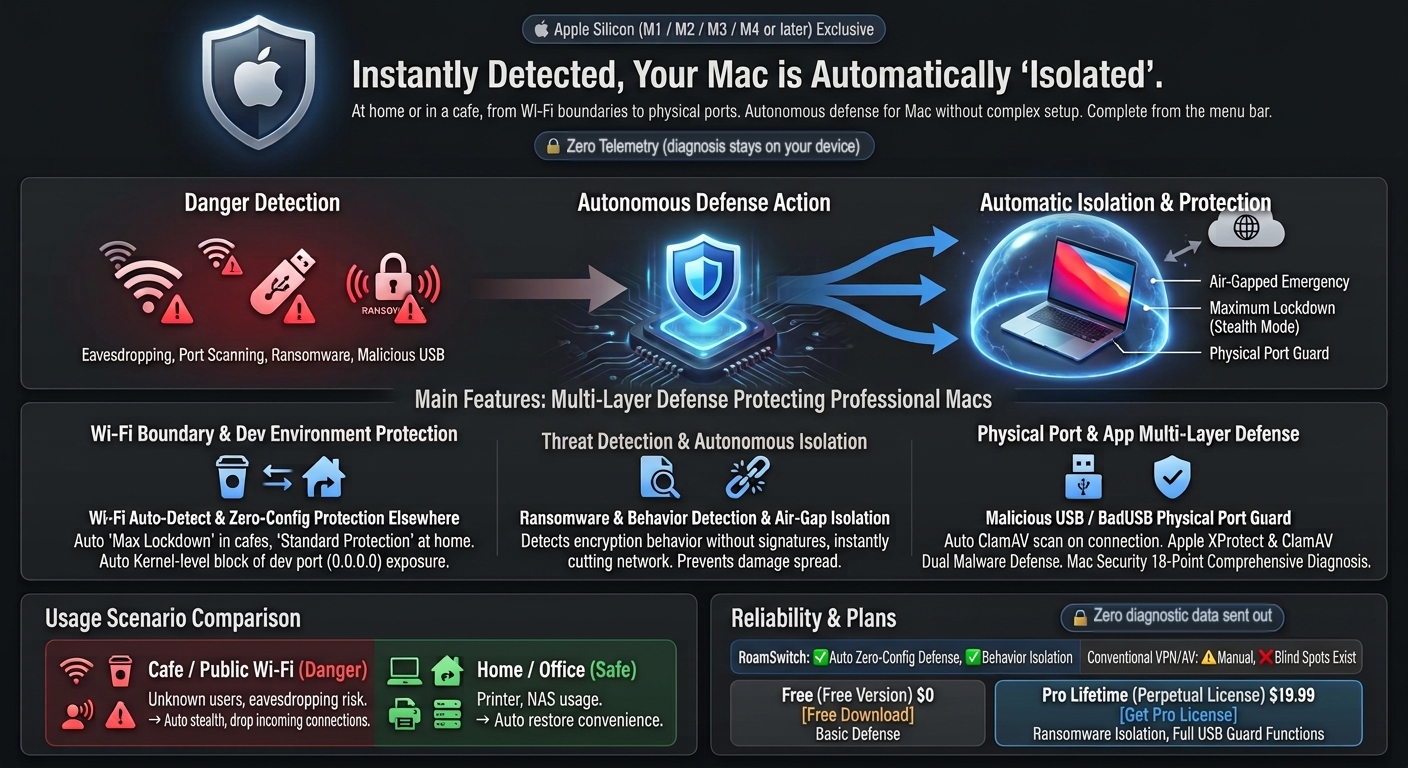
At home or in a café, from the Wi-Fi boundary to physical ports, it protects your Mac without complicated configuration. Eavesdropping countermeasures on public Wi-Fi, ransomware behavior detection with air-gap isolation, and an unauthorized-USB guard are all handled from a single menu bar app.
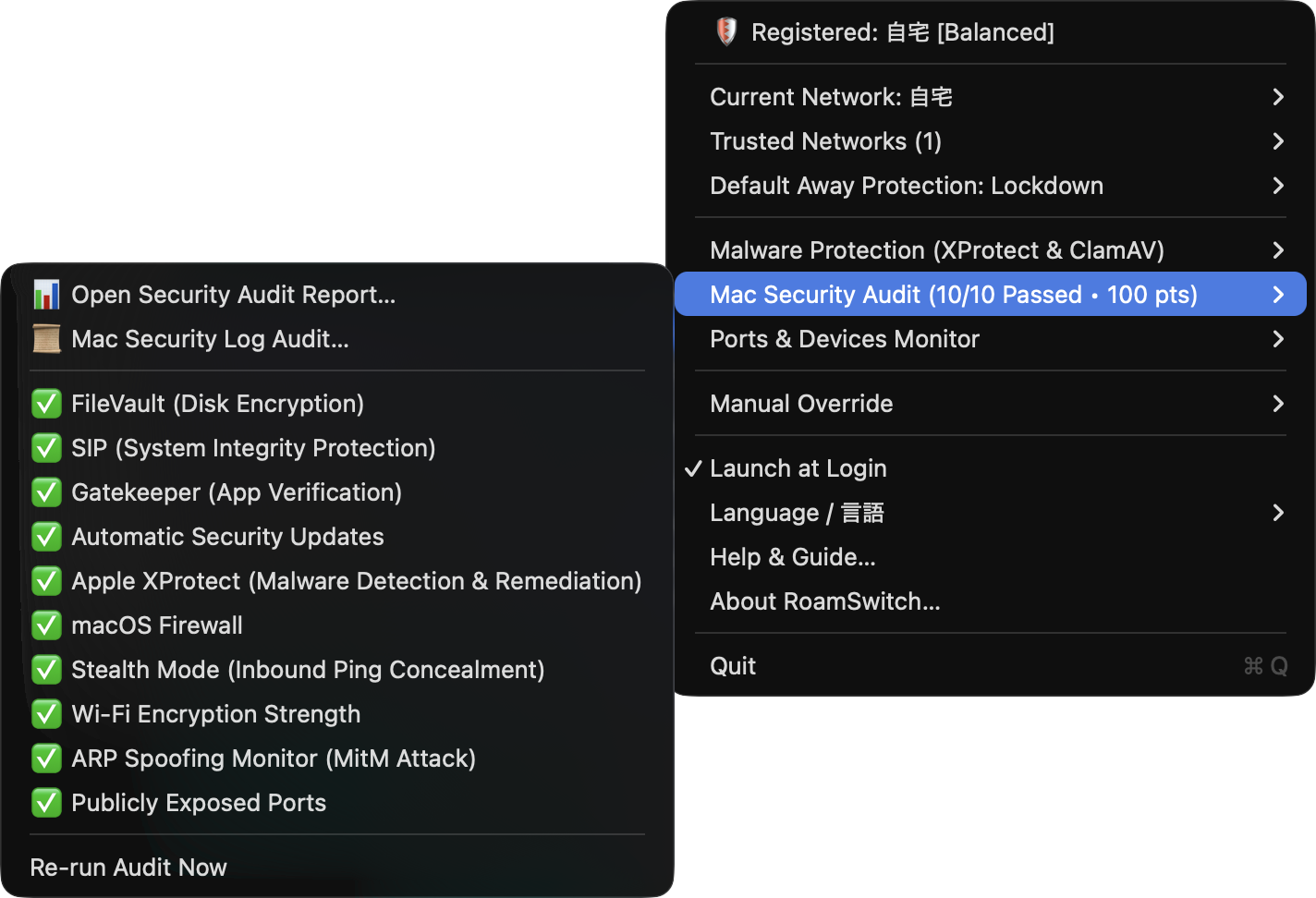
From the menu bar, instantly open the pass status of all 23 checks, anti-malware, and port monitoring
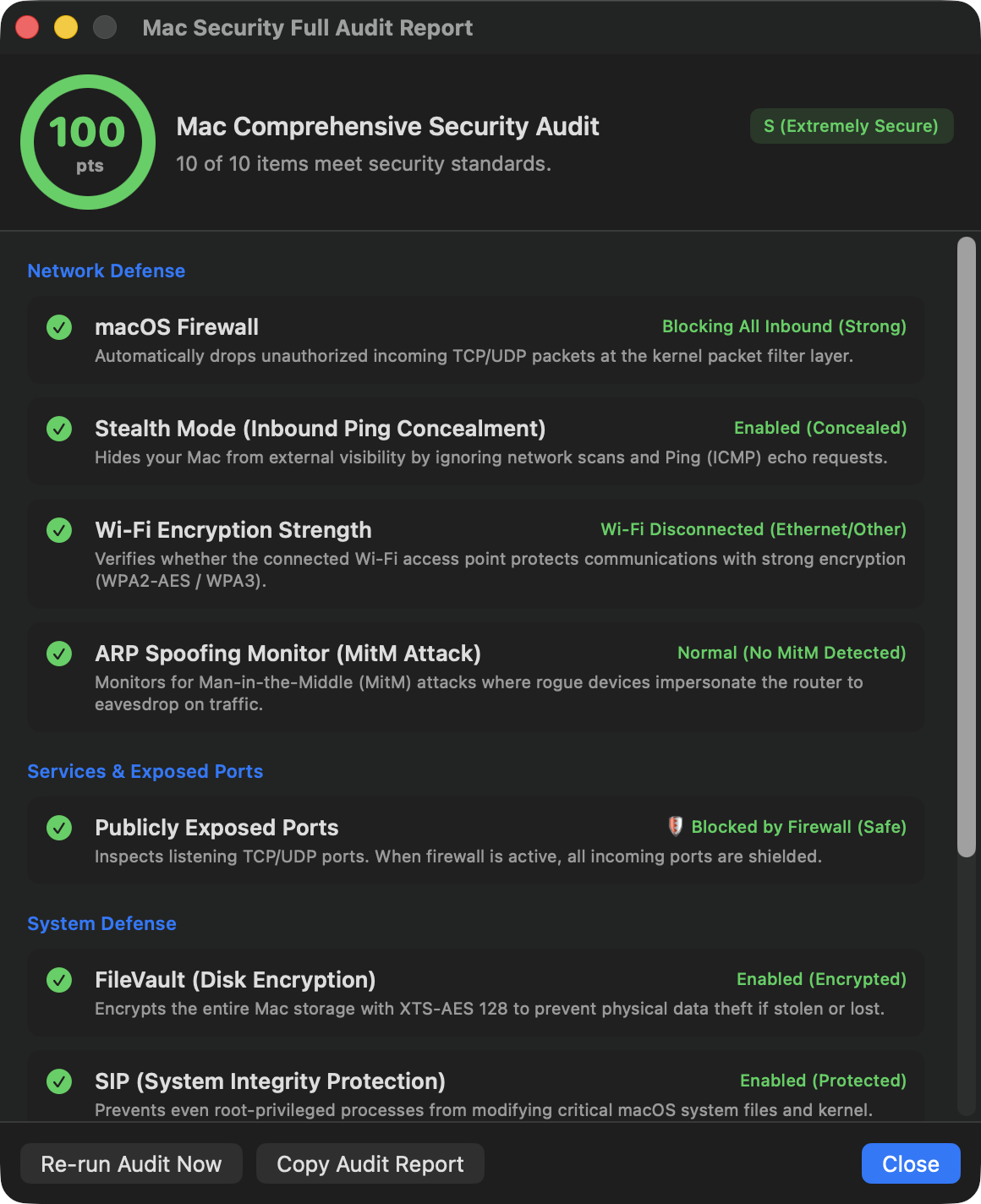
Detailed status of FileVault, SIP, Gatekeeper, the firewall, ARP spoofing, and more
For people who travel with a MacBook and for those based mostly at home or the office. Wherever you are, you do not have to worry about security settings.
On public Wi-Fi, many unknown devices are on the same network. There is always a risk of port scans and intrusion into shared folders.
RoamSwitch behavior: On unregistered Wi-Fi it switches instantly to "Away Maximum Lockdown" and discards all incoming connections from outside. The web and email remain usable (the safety of the sites you visit is a separate matter).If you leave development/AI servers such as Vite, Docker, or Ollama running and connect to Wi-Fi away from home, others on the same LAN may unintentionally see your source code under development, AI models, and admin screens.
RoamSwitch behavior: It passively audits open ports and immediately reports the risk of external exposure, and the kernel packet filter stops unauthorized access from the external LAN.On a safe network at home or work, you want to use printers, the company file server (NAS), and AirDrop with colleagues casually. But changing settings by hand every time is tedious and leads to forgetting to switch back when you go out.
RoamSwitch behavior: It identifies networks by the router-specific gateway MAC address and automatically returns to "Standard Protection" on registered networks. Your usual usability stays as it is.Ransomware infection from email attachments or suspicious downloads cannot be prevented even on a safe home Wi-Fi. Once infected, file encryption may spread at once to the NAS and other PCs at home.
Autonomous security designed for MacBooks that handle development servers and confidential files.
It identifies networks by the router's gateway MAC address. The moment you leave a "trusted network" such as home or the office, it switches the macOS firewall (Application Firewall) to maximum lockdown (the web, email, and other everyday operations remain usable). If the name of a Wi-Fi network you connect to for the first time closely resembles a known network name, it warns of a suspected rogue access point (Pro).
Diagnoses all 23 items, including FileVault, SIP, the firewall, and ARP man-in-the-middle attacks, on a 100-point scale and shows how to fix them.
The moment a port never seen before is exposed to the external LAN, it blocks it automatically without signatures (on by default when Pro is enabled). If an unauthenticated database such as Redis/MongoDB, or a local AI inference server such as Ollama/LM Studio, is exposed on 0.0.0.0, it warns immediately. For development servers such as Node.js/Vite/Docker, it audits down to CORS wildcards and authentication settings without breaking anything.
From the macOS unified log, it extracts Sudo authentication failures, SSH intrusion attempts, Gatekeeper block history, and Apple XProtect removal logs, and shows them on a timeline.
In addition to confirming that Apple's official XProtect is running, it checks the notarization and quarantine attributes of files and apps, and can also run on-demand scans with open-source ClamAV. When you connect external storage, it scans automatically, including already allowed devices, and switches to the intended permissions only after confirming it is safe. The moment XProtect detects malware, it automatically isolates the Mac from the network (on by default when Pro is enabled).
On untrusted networks, it pins the MACs of the gateway, IPv6 router, and same-link DNS in the neighbor table so that spoofed ARP/NDP cannot redirect routes (preventive lock). The moment the gateway's physical address (MAC address) changes suspiciously, it emergency-cuts communication (air-gap isolation) to prevent eavesdropping and tampering. Gateway pinning is an opt-in, off by default. The emergency cut is on by default when Pro is enabled, and you can release it at any time after confirming it is safe.
It detects ransomware behavior such as mass encryption without signatures. It watches decoy files and write entropy, so it also catches partial encryption. On detection it cuts the Mac off from the network. It also keeps APFS snapshots periodically, and you can restore them per file (Full Disk Access required). The recovery window works in the Pro edition; snapshots work in the free edition too. Detection is on by default in Pro.
When you connect an unknown keyboard or a modified USB cable (such as Rubber Ducky), it temporarily stops key input and prevents the automatic execution of malicious commands. When you connect USB storage, it fully scans it with ClamAV, including already allowed devices.
Detects files saved from Safari, Chrome, Mail, Slack and others in real time through FSEvents. It automatically scans files with the quarantine attribute (com.apple.quarantine) and dangerous Pickle-format AI models (.pkl/.pt), and quarantines infected files right away. A Pro feature, on automatically from the moment Pro is activated.
When you connect to Wi-Fi away from home, it automatically switches to a secure DNS such as Quad9 / Cloudflare Security, stopping name resolution for malware C2 and phishing sites in advance. You can choose the scope (away only / always).
Away from home, it sends all traffic through an encrypted tunnel, using a WireGuard configuration or a Tailscale Exit Node. A pf kill switch stops plaintext leaking outside the tunnel, and does not let traffic pass through unprotected if the tunnel drops. It is the main countermeasure against man-in-the-middle (MITM) attacks (opt-in).
It reads the destination of outbound connections from the DNS name, TLS SNI and HTTP Host, and warns about or blocks connections to phishing and scam sites (default is block; it also works for DoH browsers). Because the NEFilter system extension sees the actual traffic after name resolution, it does not rewrite /etc/hosts. In warn mode, with no response it fails closed. Decisions are made locally only. Traffic to external servers (such as interact.sh) that diagnostic tools use to confirm whether an attack succeeded is not stopped, only reported by notification.
It detects downloaded files using lightweight patterns for the EICAR test signature and publicly known one-line reverse shell commands (works without ClamAV). It also monitors new registrations to login auto-start (LaunchAgent/LaunchDaemon) in real time, and every 5 seconds checks for suspicious lines added to shell startup files (such as .zshrc) and git hooks. EndpointSecurity permission is not required. Auto-start monitoring is a Pro feature, on automatically from the moment Pro is activated.
Guards against ClickFix-style attacks that use a fake error or authentication screen to lure you into “paste this into Terminal and run it.” Regardless of where it would be pasted (Terminal, Script Editor, Spotlight and so on), it inspects the clipboard at the moment of copying, and if it matches a known malicious pattern, warns you before you paste, with a notification and a dialog that stays in front. The clipboard is not cleared automatically; you can empty it with the dialog's button. On Pro, an emergency network block based on monitoring command execution history can also be chosen (opt-in).
Lets you look back at notifications RoamSwitch sent (such as security log audit anomalies and ClickFix detections). Each notification includes the program and command that caused it (if they cannot be identified, it says so). Notifications past the retention period are deleted automatically.
Notifies you when a container started with --privileged, or a container that mounts /var/run/docker.sock, newly comes up (Pro, opt-in). It only reports risky settings and does not block anything automatically.
Just paste text to check for leaked API keys and tokens. It also supports recursive scans by folder, automatically excluding .git, node_modules and similar. All diagnosis is completed on the device.
Matches installed Homebrew packages and the dependencies of projects under development (7 ecosystems, including npm, PyPI and crates.io) against the local known-CVE map. It makes no network connections at all. A CVE that does not affect you can be accepted with a reason and an expiry date, and returns to normal detection once it expires. It also checks pip and npm source settings that could lead to dependency confusion attacks, and packages that gained code running at install time (Pro).
Places fake credential files such as ~/.aws/credentials and ~/.ssh/id_rsa, and notifies you right away if they are accessed (on by default when Pro is activated). You can also choose to monitor suspicious access to browsers' saved passwords and cookie databases (off by default; covers Chrome, Firefox and others, but not Orion or DuckDuckGo). Both only notify and do not block. On Mac, reads of real credential files cannot be detected.
Notifies you of a source that connects to many ports in a short time, and blocks it for 10 minutes. For SSH, it notifies you of a source with 6 failed logins in 10 minutes and blocks new connections to the SSH port for 1 hour (established sessions are not cut). The gateway, DNS, the machine itself and the SSH source currently connected are never blocked. On by default when Pro is activated (SSH works only while Remote Login is on).
It checks important system files that only root can modify against SHA-256 baselines, together with dependency lockfiles, and notifies you of tampering. This includes all files in /etc/sudoers.d and /etc/pam.d, and it also notifies you when a new file is added. If an SSH login occurred in the same time window, it is attached to the notification as a clue. On by default when Pro is activated.
Records processes started on the Mac, and detects and notifies you of techniques such as shell launches from browsers and Office, curl | sh and execution of obfuscated scripts (14 rules in total). Placing Sigma rules (process_creation) adds them to detection. Secrets in command lines are masked in the output, and you can search the records from an AI. Pro, off by default (Full Disk Access required).
Every few seconds it checks the logged-in user's own shells and interpreters, plus nc, ncat and socat, and notifies you of any whose input and output are connected to a TCP connection to a public address. It only notifies: it does not end the process or block the network. Root-privileged processes, and connections to private addresses such as a home LAN or Tailscale, are excluded. Programs you recognize can be added to the allowlist from the menu. On automatically from the moment Pro is activated.
Compares the DNS servers, routers and proxy auto-configuration (PAC) handed out by the network you connected to with the previous state of the same network. It notifies you when an unseen DNS server or PAC host appears, or when proxy auto-discovery (WPAD) is newly turned on. These are clues to a man-in-the-middle attack using a rogue DHCP server or WPAD. It only notifies and does not change settings or block anything. On automatically from the moment Pro is activated. It cannot find a rogue server that hands out the same DNS and router as before.
Even on a network you registered as “trusted (open),” such as your home, while this Mac has a serious detection such as ransomware, contact with decoy credentials or a reverse shell, it runs in standard protection with the firewall and stealth enabled. It does not isolate the Mac or block traffic, and does not go to maximum lockdown. You can revert with “Confirmed (restore trust)” in the menu, and it reverts automatically after 6 hours if there is no new detection. On by default when Pro is activated.
Write the IP addresses or ranges you allow, and new SSH connections from any source not on the list are refused before they reach the port. Established sessions are not cut. It is not turned on while the list is empty or while a source logged in right now is not on it. It cannot get past the VPN kill switch. Pro, off by default.
Checks the instruction files, skills and MCP settings read by agents such as Claude Code, Codex, Cursor and Gemini for dangerous content. It flags commands hidden with invisible characters, instruction overrides, curl | sh and tool auto-approval, and also flags changes from a confirmed state. It also covers VS Code tasks and GitHub Actions that run just by opening them, and the allow-all permissions and hooks in Claude Code's settings.json. It makes no network connections and does not display secret values.
No signatures required — it judges and acts autonomously based on behavior alone.
It detects ransomware-specific behavior, such as suspicious mass encryption of files, in real time. It does not rely on known virus definitions (signatures).
The moment a threat is detected, your Mac is cut off from the network in an emergency. Communication with the command server and the progress of encryption stop on the spot.
Stops the infection from spreading to other devices, such as the NAS on your home LAN or family members' and colleagues' PCs. You can lift the cutoff at any time once you have confirmed it is safe.
The diagnostic results can be used outside RoamSwitch as well. AI clients and your own apps can reference them directly.
The official MCP server is bundled. Ask “I got a warning I don't recognize” or “my Mac was cut off in an emergency, what happened?” and an AI such as Claude, OpenCode, or Antigravity answers with the cause and recovery steps, based on RoamSwitch's official knowledge and diagnostic results. With a local LLM (such as Ollama), you can consult it fully offline even while the network is cut off. If the logs or setting names passed to the AI contain text that looks like instructions to the AI, a warning is attached. You can also check from the AI the detection coverage for each ATT&CK technique and the running status of the guards responsible, and export it as an ATT&CK Navigator layer.
MCP server and detection logic — source published (GitHub, MIT) →
RoamSwitchKit is a free, open-source client that lets you read RoamSwitch's diagnostic results directly from Swift. Without building ARP monitoring or port scanning yourself, you can build “is the current network safe?” into your own app. Install with one line using Swift Package Manager. There is no API that changes settings.
The full list of operations the root helper can perform, every path of outbound communication, the cryptographic scheme of license activation, and the threat model and “what we do not do” are documented at a level of detail you can check against the implementation. It also includes the commands to verify the distributed binary.
Check system hardening, network defenses, and service exposure all at once.
Covers the blind spot of “Wi-Fi switching” that traditional VPNs and paid antivirus software cannot prevent.
| Features & Defense Scope | RoamSwitch |
macOS Built-in | Commercial VPN | Traditional Antivirus |
|---|---|---|---|---|
| Auto Wi-Fi Switching Zero-Config Defense | ✅ Fully Automatic (Gateway MAC / 0s) | ❌ Requires Manual Steps | ⚠️ Requires VPN (LAN exposed) | ❌ Unsupported (Scan only) |
| Dev Port (0.0.0.0) LAN Blocking | ✅ Kernel-level Drop | ⚠️ Requires Manual Rules | ❌ Cannot Defend LAN | ❌ Unsupported |
| ARP Spoofing (MitM) Monitoring | ✅ Real-time Detection | ❌ Unsupported | ⚠️ Partial Encryption Only | ❌ Unsupported |
| 23-Point Comprehensive Audit | ✅ 100-Point Score & Report | ❌ Scattered Across Settings | ❌ Unsupported | ❌ Unsupported |
| Ransomware behavior detection & autonomous isolation | ✅ Emergency air-gap on detection | ⚠️ Known variants only (XProtect) | ❌ Unsupported | ⚠️ Only in some behavior-monitoring products |
| Rogue USB / BadUSB physical port defense | ✅ Auto-block + full ClamAV scan on connect | ❌ Unsupported | ❌ Unsupported | ❌ Not supported (some premium tiers only) |
| VPN tunnel + kill-switch (fail-closed) | ✅ WireGuard / Tailscale + pf kill-switch (no leak if it drops) | ❌ Unsupported | ⚠️ Provides the tunnel; kill-switch depends on the client | ❌ Unsupported |
| Privacy (no telemetry) | ✅ Zero Telemetry (traffic is mainly license activation and receipt of update data; VPN, Sensor and similar are optional features) | ⚠️ Telemetry to Apple | ❌ Logs Kept on VPN Servers | ❌ Cloud Telemetry Uploads |
| Battery & CPU Impact | ⚡ Practically Zero (Event-driven) | ⚡ Zero | ⚠️ Constant Crypto Drain | ❌ Heavy Background Scans |
No monthly fees. All the advanced defense features are yours to use forever with a one-time license.
For those who need basic Mac defense and manual security audits.
Setup takes about 2 minutes, with one macOS approval step.
For engineers and creators who carry a MacBook around. Defense that handles threats automatically.
One-time purchase, no subscription. As a digital product, refunds are not available — please confirm it works in your environment with the free version first. Payment is completed on Stripe’s secure page.
Compatible with macOS 13.0 Ventura or later. Set up in minutes from download.